Sainsbury’s | Speeding Up the Self-Service Checkout Flow
Bootcamp Project
Duration: 1 Day
The Challenge
Sainsbury's believed reducing self service checkout time would increase revenue by improving customer throughput. While the business objective was clear, little was known about which parts of the experience were actually slowing customers down.
My goal was to identify the biggest sources of friction and explore opportunities to reduce transaction time within a single day of discovery.
My Process
With only one day available, my priority was not to redesign the interface, but to identify the highest impact opportunities to reduce checkout time. Rather than making assumptions, I focused on quickly understanding the existing experience, validating where friction occurred, and generating ideas that aligned with the business objective while improving the customer experience.
Although the brief focused on speed, I recognised that faster wasn't necessarily a user need. Instead, I looked for moments where reducing customer friction could naturally shorten the checkout journey, creating value for both users and the business.
Understanding user behaviour
Before exploring solutions, I needed to understand how customers were currently moving through the checkout journey and where friction was occurring. With no existing user research or behavioural data available, I combined observation, journey mapping, conversations with store staff and competitor analysis to build a picture of the current experience and identify opportunities to investigate further.
Observed the existing checkout journey
To understand where time was being lost, I observed the current self checkout flow and mapped the end-to-end user journey. Breaking the experience down into individual steps helped identify interactions that appeared to add friction or delay and highlighted areas worth investigating further.
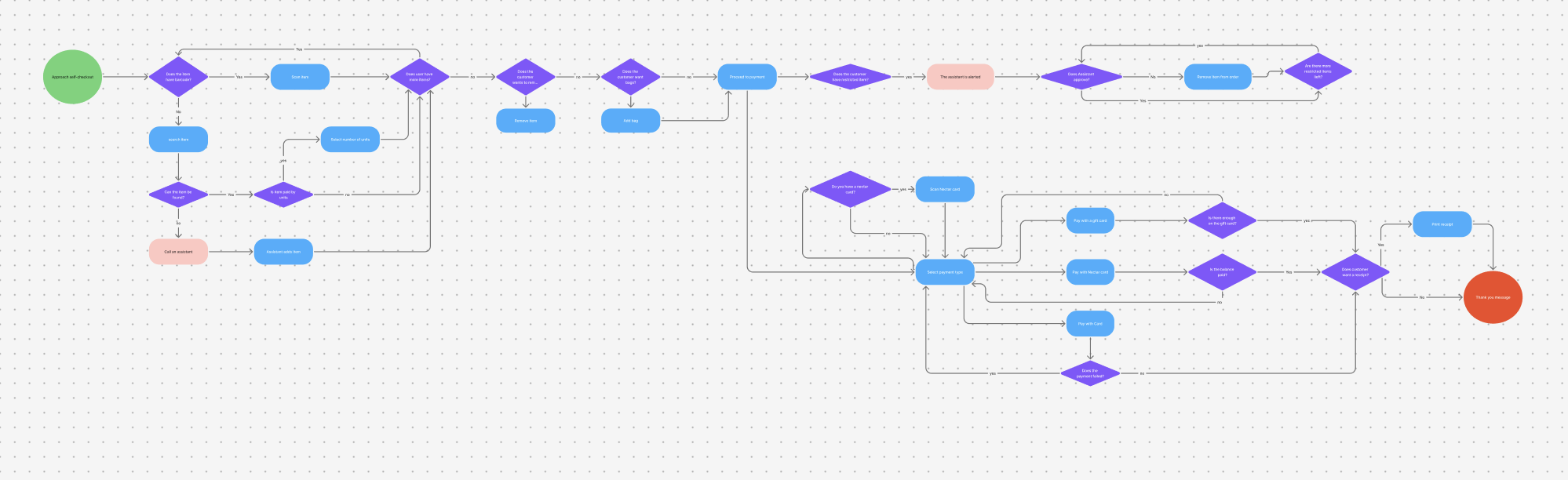
User Journey Map
Key observations
The checkout journey begins with a Start button, raising the question of whether this interaction provides value or introduces an unnecessary step.
Customers are prompted to add bags before scanning items. Given more time, I would have analysed usage data to understand how frequently this option is used and whether it could be integrated elsewhere in the journey.
The payment flow doesn't appear to adapt to customer behaviour. I would have explored transaction data to understand the split between payment methods and whether defaulting to card or detecting payment intent, as seen on some ticket machines, could reduce decision time.
The smaller handheld scanner was noticeably slower and less ergonomic than the larger scanner, suggesting the hardware itself may contribute to longer transaction times.
Understanding operational pain points
Speaking to a member of staff revealed a recurring issue that hadn't appeared in my initial observations. Customers purchasing multiple identical items couldn't simply increase the quantity, resulting in repetitive scanning and frequent requests for assistance.
Benchmarked alternative self-checkout journeys
To understand whether opportunities existed beyond Sainsbury's current implementation, I compared self-checkout journeys across other retailers. This helped identify different approaches to common interactions and highlighted areas where the experience could potentially be streamlined.
Key observations
Some retailers omitted a dedicated receipt confirmation screen, raising the question of whether this decision was necessary within Sainsbury's journey.
Requiring staff assistance brought the checkout flow to a complete stop. Allowing customers to continue scanning while waiting could reduce unnecessary interruptions.
Tesco's accessibility features were noticeably more comprehensive, suggesting opportunities to improve inclusivity alongside checkout efficiency.
Opportunities to reduce checkout time
Remove unnecessary decisions
Remove Start button.
Remove receipt confirmation.
Remove the add a bag screen.
Reduce interruptions
Continue scanning while waiting for assistance.
Simplify the payment journey
Default to card.
Reflection
This project reinforced the importance of understanding the problem before designing solutions. Working within a single day forced me to prioritise the highest-value research activities, make decisions with incomplete information, and focus on identifying opportunities rather than perfecting interfaces.
It also strengthened my ability to map complex user journeys quickly and distinguish between business objectives and user needs. Rather than treating speed as the problem, I looked for ways to reduce customer friction that could also support the business goal of faster checkouts.